Panel reference
Fans panel
Cooling control
Where More → Fans
Controls 5
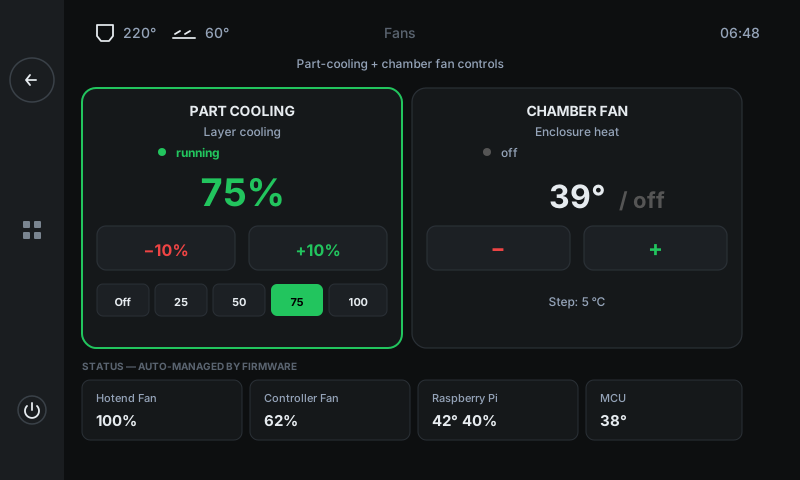
Two controllable fans (Part cooling + Chamber) get big interactive cards with ± buttons and preset pills. The row below shows the firmware-managed fans (Hotend fan, Controller fan, Pi cooling, MCU) read-only — you can see they're alive but can't accidentally fight the firmware.
1
2
3
4
5
1
Part Cooling card
Layer-cooling fan speed.
Set the part-cooling fan as a percent. ± steps in 10%, or tap a preset pill (Off / 25 / 50 / 75 / 100). Green border = fan is running. The slicer's commanded value at print start is the starting point; you can override it from here or from Fine Tune during a print.
2
Chamber Fan card
Enclosure heat target.
Sets the chamber fan's target temperature in °C — the fan modulates speed to hold the enclosure at that temperature. ± steps in 5°C. 'Off' means no target — the fan is idle. Useful for ASA / ABS to keep the chamber warm.
3
± controls
Adjust current value.
Big tap targets. For part cooling: −10% / +10%. For chamber: −5°C / +5°C. Hold to repeat-fire for fast adjustments.
4
Preset pills (Part Cooling)
One-tap speeds.
Off / 25 / 50 / 75 / 100 — quick jumps to common values. The currently-selected preset is shown in green. Tap any to set immediately.
5
Status row
Auto-managed firmware fans.
Hotend fan (heater-driven, keeps the heatbreak cool), Controller fan (mainboard cooling), Raspberry Pi (SBC cooling, shown with temperature + fan speed), and MCU (the toolhead board's local temperature). All read-only — the firmware manages them based on temperature.
Good to know
- Part cooling is also adjustable live during a print from Fine Tune — values here vs. there are the same setting.
- Chamber fan target is set in °C (not %); the fan modulates its own speed to hold the enclosure at that temperature.
- If the Hotend or Controller fan shows 0% while the printer is hot, something's wrong — those fans should always run when the heater is on. Open a support ticket from the Info panel.