Panel reference
Info panel
Printer identity + system status
Where More → Info
Controls 7
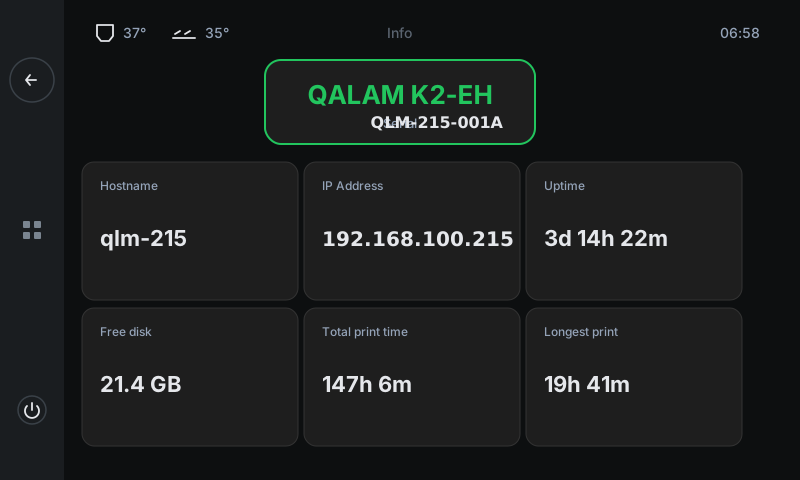
Read-only panel showing the printer's identity and the key system facts you might need: serial number + model on top, six cards below covering hostname, LAN IP, uptime, free disk, total print time across the machine's life, and the longest single print. Useful when filing a support ticket — the team will ask for most of these values.
1
2
3
4
5
6
7
1
Identity badge
Model + serial.
Printer model in big green type (read from /etc/machine-serial) and the unique serial number underneath in monospace. The model determines which Klipper config the printer boots with; serial is your unique identifier — quote it on support tickets.
2
Hostname
Network name.
What the printer calls itself on the LAN (e.g. qlm-215.local). Useful for opening Mainsail / Fluidd from another device — type http://hostname.local in your browser.
3
IP Address
LAN IPv4.
The printer's address on your local network. Used for SSH access, for slicer uploads, and for everything the cloud tunnel proxies. If this is blank, your network's broken — check WiFi.
4
Uptime
Time since last reboot.
How long the Raspberry-Pi / CB1 host has been running since its last reboot. A long uptime is healthy. Sudden short uptime (e.g. minutes when you've been printing for hours) means the host crashed or rebooted — check Info → uptime after any oddity.
5
Free disk
G-code storage available.
Space left for new G-code files on the printer. When this drops under ~1 GB, delete old files from the Print panel or via Mainsail. Klipper logs eat ~50 MB per week; an SD card at 0 free will cause silent failures.
6
Total print time
Lifetime print hours.
Cumulative hours this machine has spent actually printing (counted across all jobs, all time). Useful for maintenance scheduling — most printers want belt re-tension every 250-500 hours, hot-end clean every 100 hours.
7
Longest print
Single-job record.
How long the longest single print was, ever. Mostly a fun stat. But also a confidence indicator — if your longest print is 4 hours, plan to babysit anything longer until you know the machine handles it.
Good to know
- All values here are read-only. The serial number is set at the factory; everything else updates automatically based on the host's state.
- Screenshot or photograph this panel when opening a support ticket — saves several back-and-forth messages with the support team.
- Software version info (Klipper, Moonraker, firmware) isn't on this panel — it's in Mainsail's Machine tab or via SSH. Info focuses on the operator-relevant identity + uptime metrics.