Panel reference
Temperature panel
Heater control
Where Home → tap any temperature card · or · More → Temperature
Controls 5
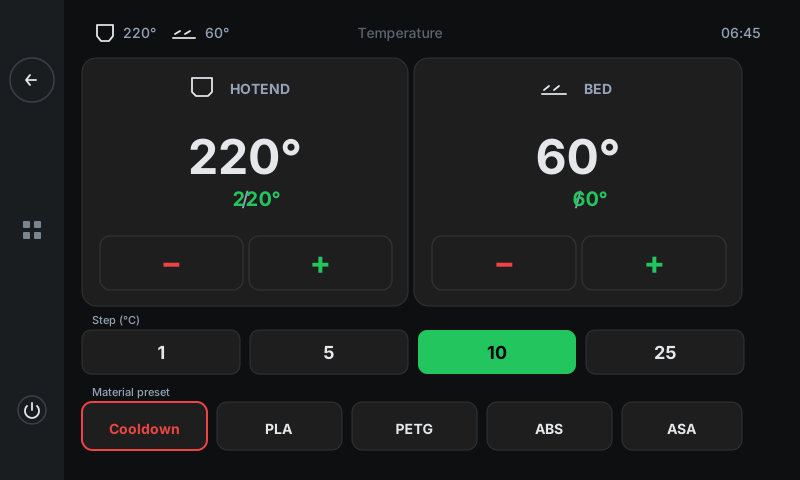
Direct control of every heater on the printer. The panel auto-discovers what's connected — usually Hotend + Bed, sometimes a chamber heater too — and gives each one a big card with live readout + ± buttons. A shared step-size picker controls how much the ± buttons jump, and a Material preset row at the bottom sets sensible targets for every heater at once.
1
2
3
4
5
1
Hotend card
Nozzle temperature.
Combined readout: big current temperature in white, then ' / target ' underneath in green. Reads 'off' (dim grey) when the target is 0. The ± buttons step the target up/down by whatever the Step picker below is set to.
2
Bed card
Build plate temperature.
Same shape as Hotend. The panel auto-discovers heaters at startup, so if you have a chamber heater, an additional card appears alongside these two.
3
± buttons (per card)
Step the heater's target.
Red minus / green plus. Each tap moves the target by the currently-selected Step value (below). The Klipper config's max_temp caps the upper end — if you hit the cap, a brief popup tells you.
4
Step picker
Shared step size for ± buttons.
Four pills: 1 / 5 / 10 / 25 °C. Selected pill is green. Applies to BOTH heater cards — pick a coarse step for ramping, a fine step for tuning the exact target.
5
Material preset row
One-tap heater profiles.
Tapping a preset sets ALL heaters in one shot. Cooldown (red) zeroes every heater. PLA / PETG / ABS / ASA set the hotend + bed to that material's defaults (e.g. PLA: 200°C / 60°C). Profiles come from Klipper config — your installer can edit them in klipperscreen.conf.
Good to know
- There's no per-card 'Off' button — to turn a heater off, set its target to 0 with the minus button (or tap Cooldown to zero everything).
- Heater discovery is automatic: a printer with no chamber heater shows just Hotend + Bed. A printer with extra heaters (multi-extruder, separate chamber heater) shows more cards.
- Heater watchdogs catch dangerous conditions: a thermal runaway (heater on but temperature not climbing) shuts the printer down automatically. If you see that error, the heater cartridge or thermistor needs attention.