1
Current state strip
What's loaded right now.
Green dot + 'Loaded' + material name when filament is present; grey dot + 'Empty' otherwise. The right side shows the live hotend temperature.
Panel reference
Load, unload, swap filament
Everything for filament changes lives here. Pick the material from the picker — that sets the right hotend temperature automatically — then tap Load or Unload. The printer handles the rest with a live operation view showing heating / loading / complete states.
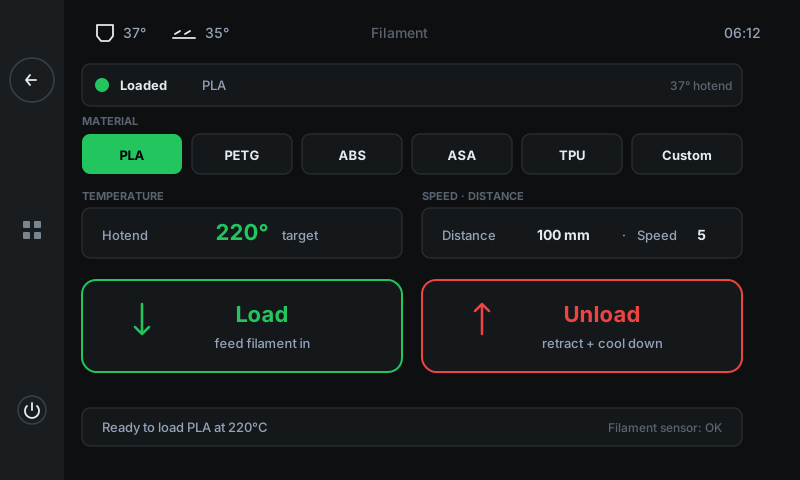
What's loaded right now.
Green dot + 'Loaded' + material name when filament is present; grey dot + 'Empty' otherwise. The right side shows the live hotend temperature.
Sets the right hotend temp automatically.
Six pills: PLA (190 °C), PETG (240 °C), ABS (250 °C), ASA (250 °C), TPU (220 °C), Custom (configurable). Pick first — the temperature card below updates instantly so heating starts at the right value.
Live hotend temp + target.
Current hotend reading plus the target set by the material picker. Goes green when at target. Wait for green before pulling filament — the strand needs to be molten.
How much filament to push, how fast.
Distance (100 mm by default — covers the bowden tube + clean purge) and speed (mm/s of filament travel). Bump distance to 150 mm for big colour swaps so the old colour fully purges.
Feed filament IN.
Use this after you've inserted a new spool into the extruder. The printer heats first if needed, then feeds Distance mm of filament through to the nozzle.
Retract filament OUT.
Heats the nozzle, melts the existing strand free, then retracts Distance mm so you can pull it the rest of the way by hand without stripping the gears.
Operational hints + sensor state.
Plain-language status (e.g. 'Ready to load PLA at 220°C') and on the right, the runout-sensor state if your machine has one.