1
X axis card
Resonance frequency + shaper for X.
Live X-axis resonance frequency in Hz, with ±0.5 Hz adjust buttons. The shaper grid below picks how Klipper smooths motion to cancel ringing at that frequency.
Panel reference
Vibration / ringing tuning
Set the X and Y resonance frequencies and shaper type to cancel ringing artefacts (those echoes you see after sharp corners on tall walls). Auto-calibrate via Measure X / Y / Both if you have an ADXL accelerometer mounted, or set values manually if you already know them.
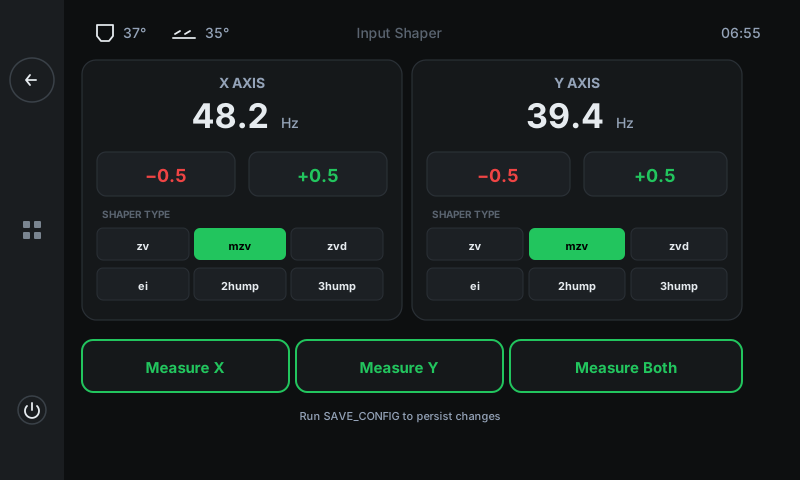
Resonance frequency + shaper for X.
Live X-axis resonance frequency in Hz, with ±0.5 Hz adjust buttons. The shaper grid below picks how Klipper smooths motion to cancel ringing at that frequency.
Resonance frequency + shaper for Y.
Same shape as the X card but for the Y axis. Y is usually a lower frequency than X because the Y mass is heavier (whole bed moves, in some designs).
Step the frequency up or down by 0.5 Hz.
Manual tuning. The right frequency is found by Measure (below) or by running the SHAPER_CALIBRATE flow externally and writing the result here.
Six shaper algorithms.
zv (default, fastest), mzv (modified zv — most common pick on the QALAM), zvd (more aggressive), ei (extra insensitive), 2hump_ei (two-frequency), 3hump_ei (three-frequency). The selected shaper is shown in green.
Auto-calibration via ADXL accelerometer.
Runs Klipper's SHAPER_CALIBRATE flow on the chosen axis. The toolhead vibrates at progressively higher frequencies while the accelerometer records the response. After ~2 minutes per axis, the panel writes the optimal frequency + shaper to the corresponding card.