Panel reference
Move panel
Manual axis jogging
Where Home → Move tile
Controls 6
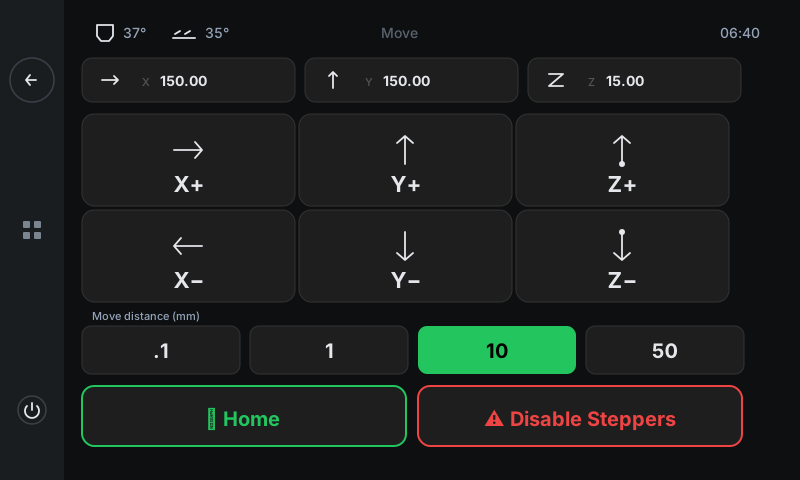
Jog X / Y / Z by precise distances. Used for diagnostics (checking belt tension, probing bed gap), positioning (centring a print, parking the head), or freeing a stuck part. Pick a distance with the pill row, then tap a jog button to nudge.
1
2
3
4
5
6
1
Position cards
Live X / Y / Z coordinates.
Three cards showing where the toolhead is right now, in millimetres. Updates once per second as the printer moves. Showing '?' instead of a number means that axis isn't homed yet — tap Home (footer) before jogging.
2
Jog grid — positives (X+ / Y+ / Z+)
Move each axis in its positive direction.
Top row of the 2×3 grid. Each tap moves the toolhead by the currently-selected distance (the highlighted pill below). X+ moves right, Y+ moves back (away from the operator), Z+ raises the toolhead.
3
Jog grid — negatives (X− / Y− / Z−)
Move each axis in its negative direction.
Bottom row of the 2×3 grid. X− moves left, Y− moves front (toward the operator), Z− lowers the toolhead. Z is clamped to a safe range — you can't crash the nozzle into the bed.
4
Move distance pills
Step size for each jog.
Four pills: .1 mm (precise touch-up), 1 mm (fine), 10 mm (default — green), 50 mm (fast). Selected pill is highlighted green. Tap a pill to change the step; the next jog button press will move by that amount.
5
Home
Run a full home cycle (G28).
One tap homes X, Y, then Z (in that order). Klipper needs this once per power-on before any motion is allowed. Re-run it after Disable Steppers, or any time the position readouts show '?'.
6
Disable Steppers
Free the motors for hand-jog.
Sends M18 / M84 — all stepper motors stop holding position so you can push the toolhead by hand. Warning: on most printers the Z axis drops a few millimetres when you do this because gravity pulls the gantry down. The panel shows a confirm before sending.
Good to know
- Jogging is blocked during an active print — pause first if you need to nudge an axis mid-print.
- Axis directions follow standard convention: X+ = right (as you face the printer), Y+ = back (away from you), Z+ = up. The printer.cfg can flip any axis if your hardware wires them backwards.
- There's no extruder control on this panel — filament push / retract lives on the Filament panel.